
Weglot Multilingual

Get 20% off with QUEENWIX20
The Weglot multilingual app has been used by Code Queen since 2019 for all of Code Queen's websites. You can translate any site in seconds by installing their app via their easy to use dashboard. It only took us 5 minutes to configure the app and our site was ready to go!
Have you tried to translate your Wix website recently but have found it really difficult because you don't know where to start? Do you need to code this function? Is the Wix Multilingual app sufficient enough?
Thousands of people are actively using Weglot because it is a very efficient time-saver app to use to translate your entire Wix website. Watch the video above to see how we configured and installed it on our Wix website. Since you are already here, look for the translation button in the corner of the screen and test it out for yourself. Select any language and watch how the page instantly gets converted to that language.
This is extremely helpful in case you do not speak a certain language but you still want to provide your visitors with the ability to change the language with a click of a button. I know what you're thinking: "But Google Translate already does that". Well does Google Translate allow you to manage and modify the automated translation for each of your pages? Nope! But Weglot does!
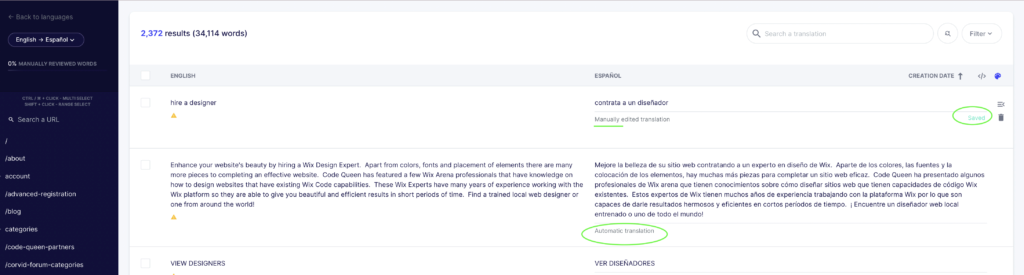
Weglot has a very organized and easy to use backend dashboard that allows you to view the translations for your pages and modify them as needed! This way you work smarter and not harder. Let the Weglot app do the heavy lifting for you and you can polish up any translation to fit your audience and website.
What are you waiting for? Try out Weglot free today!
Create Free Weglot Account