
Using a form to calculate simple math like adding values or subtracting values
About
Many Wix users create custom forms to calculate numbers based on the different answers a visitor selects on their custom form. These types of forms are often called:
- Online Quotes
- Instant Quotes
- Online Calculators
- Online Estimator
The following are simple code snippets that combine values upon a button click. The code can be written in so many ways, but we are using a simple format in order to help you learn what the code says so you can easily modify it for your own use.
$w.onReady(function () { //cq
    $w("#submitButton").onClick((event) => { let total = Number($w("#firstQuestion").value) + Number($w("#secondQuestion").value) + Number($w("#thirdQuestion").value); });

});
$w.onReady(function () { //cq
    $w("#submitButton").onClick((event) => { let one = Number($w("#firstQuestion").value); //The expected values should be numbers let two = Number($w("#secondQuestion").value); //The expected values should be numbers let three = Number($w("#thirdQuestion").value); //The expected values should be numbers let four = Number($w("#fourthQuestion").value); //The expected values should be numbers
 let total = one + two + three + four; });

});
Link to live example: https://codequeen.wixsite.com/calculator-example
Follow Along #1
Create a form using input elements
For our tutorial, we created a short form of 5 questions by using dropdown elements, radio button element and a checkbox element. We gave each element a numeric value so that it could combine all the numbers at a later time. We marked all the elements as 'required' via the settings panel of each one. The only element we did not mark as 'required' was the checkbox. Refer to the screenshots to see what values we used for our tutorial form:
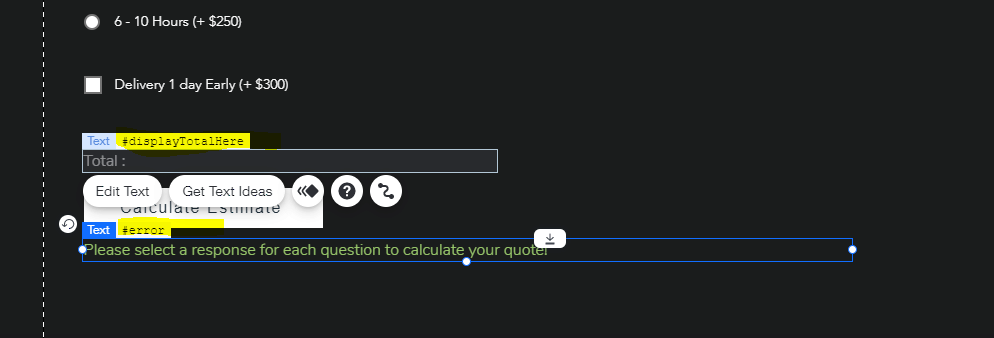
We also added 2 text elements (#displayTotalHere and #error) because we want to be able to display a total or result upon button click. If a user accidentally skipped a required field, we want to display an error message so they can be instructed to check their responses.
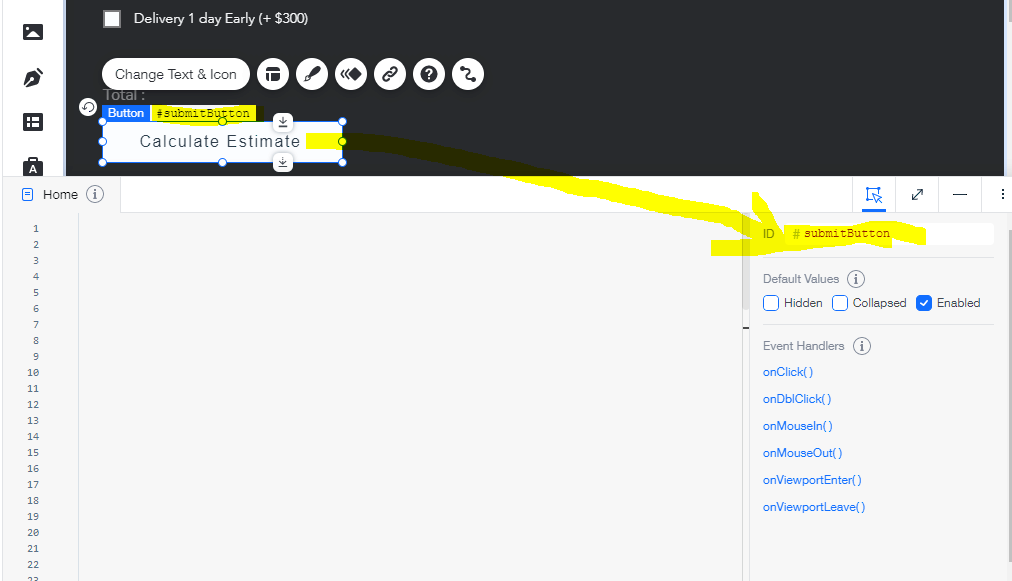
We added a button and made sure that it was not linked to any URL via the link icon. Since we will be writing code to trigger a custom function within our page code, we will also make sure to remove any dynamic connection to this button.
[ Note: If you are creating a calculating form to collect and save data, you will need to modify your code to save the data via code instead of a dataset. ]
Follow Along #2
Add page code
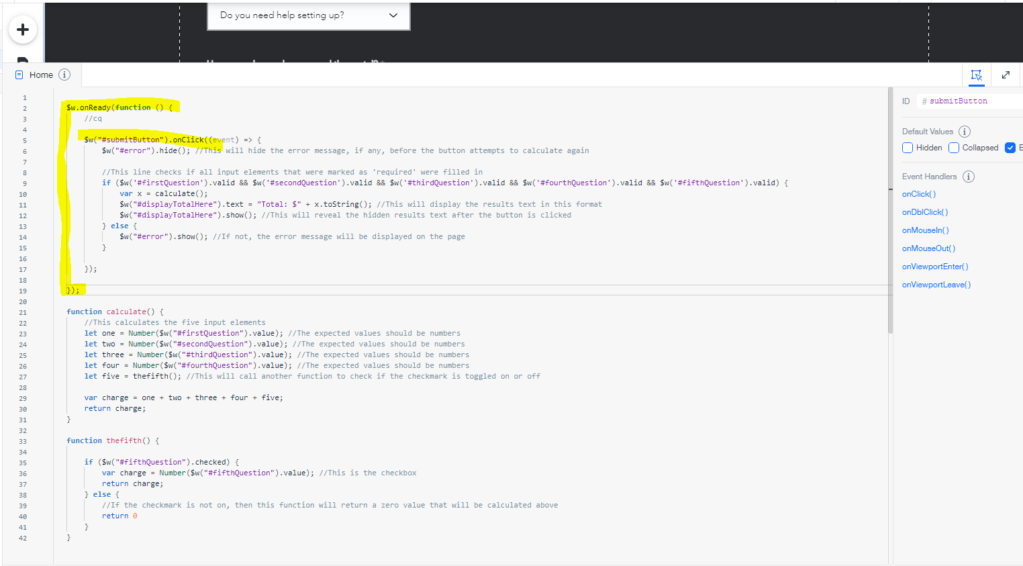
elow you will find the code we used for our tutorial. Be sure to update it with the actual element ID's that are on your page. If you have any existing code on your page, please note that you must add the button onClick code inside of the onReady. The rest of the tutorial code is placed outside of the onReady.
 $w.onReady(function () { //cq
    $w("#submitButton").onClick((event) => {        $w("#error").hide(); //This will hide the error message, if any, before the button attempts to calculate again
 //This line checks if all input elements that were marked as 'required' were filled in if ($w('#firstQuestion').valid && $w('#secondQuestion').valid && $w('#thirdQuestion').valid && $w('#fourthQuestion').valid && $w('#fifthQuestion').valid) { var x = calculate();            $w("#displayTotalHere").text = "Total: $" + x.toString(); //This will display the results text in this format            $w("#displayTotalHere").show(); //This will reveal the hidden results text after the button is clicked } else {            $w("#error").show(); //If not, the error message will be displayed on the page }
 });

});

function calculate() { //This calculates the five input elements let one = Number($w("#firstQuestion").value); //The expected values should be numbers let two = Number($w("#secondQuestion").value); //The expected values should be numbers let three = Number($w("#thirdQuestion").value); //The expected values should be numbers let four = Number($w("#fourthQuestion").value); //The expected values should be numbers let five = thefifth(); //This will call another function to check if the checkmark is toggled on or off
 var charge = one + two + three + four + five; return charge;
}

function thefifth() {
 if ($w("#fifthQuestion").checked) { var charge = Number($w("#fifthQuestion").value); //This is the checkbox return charge; } else { //If the checkmark is not on, then this function will return a zero value that will be calculated above return 0 }
}
Disclaimer
Our free and premium content is non-exclusive, meaning you are not the only one with access to the content. You can customize our content to fit your end product. Redistribution of our content is strictly prohibited. This means you cannot make our content available to others as-is, stand-alone products or stock products in ANY LANGUAGE, regardless if you offer our content for free or not.